

EDR, XDR, and managed EDR are often used interchangeably in marketing, and that confusion makes it hard for small businesses to choose. Most comparisons focus on feature lists. For a firm with fewer than 100 employees, the more important question is simpler: when the software raises an alert, who does something about it?
This post explains what each model delivers, what it leaves to you, and which one fits a small business without an internal security team.
The Real Difference Is Who Does the Work
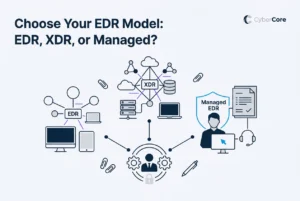
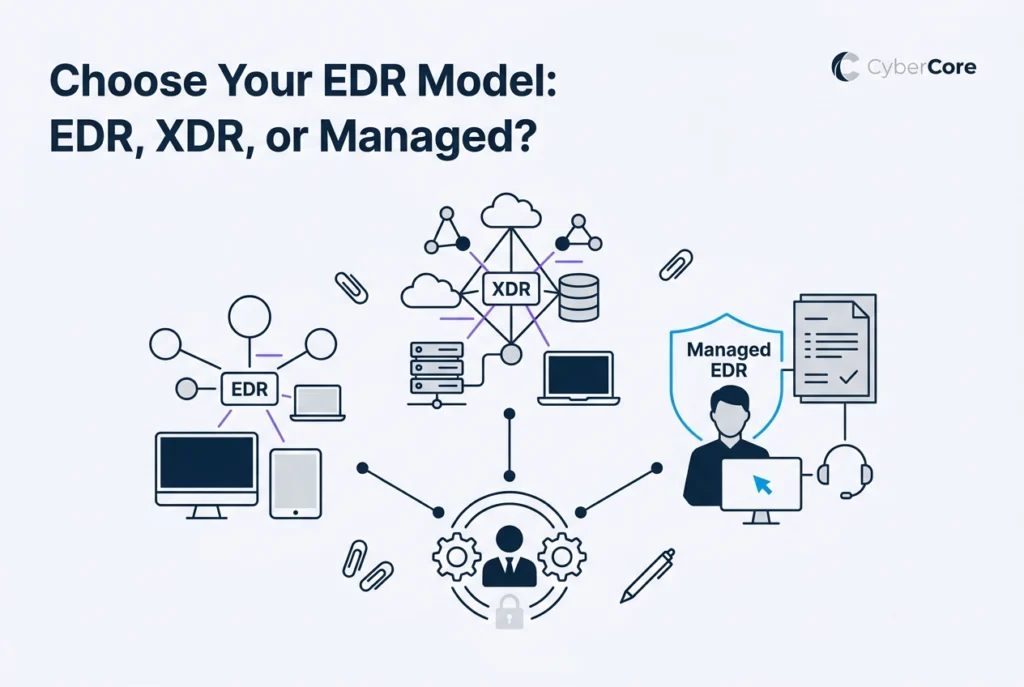
EDR, XDR, and managed EDR represent three different assumptions about who is watching and responding.
- EDR collects detailed activity from your devices and raises alerts. Someone qualified has to review those alerts and decide what to do.
- XDR extends that visibility beyond devices to email, cloud applications, identity systems, and network traffic, and connects related signals. It still relies on someone to act on what it finds.
- Managed EDR adds the missing piece: a security team that monitors alerts around the clock, investigates, and responds on your behalf.
For an organization without a security analyst on staff, the quality of the detection engine matters far less than whether anyone is acting on its findings. An alert no one reads doesn’t stop an attack.
What EDR Delivers and What It Leaves to You
Endpoint detection and response runs a small agent on each laptop, desktop, and server. That agent records what’s happening: which programs run, what they launch, which files change, and what connections they make. When activity looks like an attack, the platform raises an alert.
EDR can often isolate a device or stop a process, but deciding whether an alert is real, how serious it is, and how to investigate still takes trained judgment. In a large organization with a full-time security team, that works well. In a 20-person office, alerts may sit unreviewed until someone has time, and by then the damage may be done.
What XDR Adds and Who It’s Built For
Extended detection and response pulls in information from more places than just devices. Attacks often move across systems: a phishing email leads to a stolen login, which leads to access to cloud files. XDR connects those pieces into a clearer picture and can reduce the number of low-value alerts.
That’s a real improvement, but it doesn’t remove the staffing need. XDR is designed for organizations that already have security staff or an outside security operations team in place. It delivers better information to an analyst. It doesn’t replace the analyst.
What Managed EDR Delivers
Managed EDR combines the detection technology with a security operations team that monitors alerts, investigates suspicious activity, looks proactively for signs of compromise, and takes action when a threat is confirmed.
The difference is clearest outside business hours. With self-managed tools, an alert that fires on a Saturday may wait until Monday. With a managed service, a security team is watching and can isolate an affected device right away.
Managed services also reduce noise. Analysts filter out false alarms so your team only hears about things that matter.
Side by Side
| EDR | XDR | Managed EDR | |
|---|---|---|---|
| Coverage | Devices | Devices plus email, cloud, identity, and network | Devices, often extended by service level |
| Who monitors alerts | Your team | Your team | The provider’s security team |
| Who responds | Your team | Your team | The provider, coordinating with you |
| Staffing needed | Qualified security staff | Experienced security team | A business contact to coordinate with |
| Best fit | Organizations with security staff | Mature security programs | Organizations without internal security staff |
Why Regulated Businesses Benefit From the Managed Model
Healthcare practices under HIPAA, financial businesses under the FTC Safeguards Rule, and organizations that accept card payments under PCI DSS are expected to monitor their systems and respond to security incidents, and to be able to show they did.
Owning a tool isn’t the same as using it. A self-managed platform that no one reviews doesn’t create a record that alerts were investigated. A managed service produces that record as a normal part of its work, which helps show your organization took reasonable steps.
When Self-Managed EDR or XDR Makes Sense
Self-managed tools can be the right choice when:
- You have at least one qualified security professional whose primary job is monitoring and responding to alerts
- You already have an outside security operations team that will act on the data
- You’re deliberately building an internal security function and have a plan to staff it
If you’re unsure whether your team could keep up with EDR alerts, that’s usually a sign a managed service is the better fit.
How CyberCore Delivers Managed EDR
CyberCore Technologies includes managed EDR with 24/7 monitoring and response in every service plan. A security operations team watches alerts around the clock and takes immediate action on active threats, such as isolating an affected device. Lower-severity alerts that don’t need emergency action are reviewed by the CyberCore team during the business day.
That means small businesses across Des Moines and central Iowa get continuous monitoring and response without hiring security staff, along with records of monitoring and incident handling that support compliance efforts.
Choosing the Right Model
The right endpoint security model isn’t about the longest feature list. It’s about whether someone is actually doing the work. Ask yourself one question: if an alert fired late on a weekend, who would respond? If the honest answer is “no one until Monday,” a managed approach is worth a closer look.
If you’d like to talk through your current setup, CyberCore offers a free assessment and we’re happy to help whenever the timing is right.